 Tableau | Data visualisation | Analytics
 Count & CountD functions in Tableau
The functions help you count but they work slightly differently. Find out more in this video.
- COUNT returns the number of items in a group and ignores null values, effectively acting as a row count when applied to a field
- COUNTD (count distinct) counts each unique value only once, so counting subcategory within a single subcategory grouping returns one
- COUNTD is useful for guarding calculations so they only fire when you are at the lowest, single-item level of a grouping
- Because count ignores nulls, comparing a count against your dataset's row total gives a quick data quality check
Building the base view
Count and count distinct are two of the simplest functions in Tableau to understand, and they’re genuinely easy to use once you’ve seen them in action. To demonstrate, I connected to the American version of the Superstore sales data and built a very simple view.
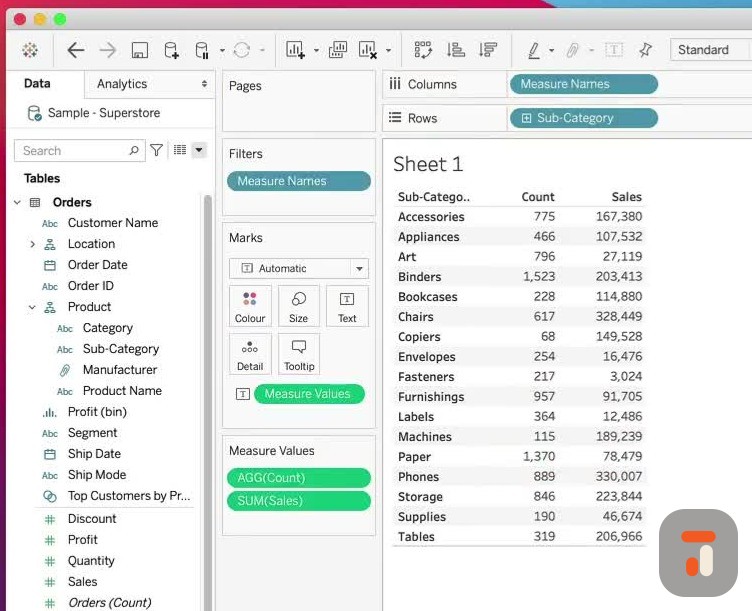
I dragged the product hierarchy’s subcategory onto rows, then brought in sales just to give the table a bit of context and some numbers to look at. With that foundation in place, the differences between the two functions become obvious.
Using the COUNT function
Opening a calculated field and typing “count” surfaces both options: COUNT and COUNTD (count distinct). Starting with COUNT, Tableau’s description on the right tells you exactly what it does: it returns the number of items in a group, and null values are not counted. The “items” here simply refers to whatever you place inside the expression.
When I wrapped COUNT around subcategory and dropped it into the view, the binders grouping showed 775. That might seem odd when you’re counting a single subcategory, but COUNT tallies every instance it sees, again and again. With subcategory in the view it’s effectively counting the number of records.
The Superstore dataset has 9,994 rows, and if you add up the counts across the column they come to roughly that same total. So COUNT should really only be used where you don’t mind something being counted more than once. There’s only one subcategory in the binders grouping, but COUNT registers each and every instance, which makes it behave like a row count.
Using COUNTD (count distinct)
To see the contrast, I created another calculated field using COUNTD on subcategory and named it “countd” for short. Count distinct works exactly as the name suggests: if it sees the same item multiple times, it only counts it once.
When I dropped this into the view alongside the COUNT result, the binders grouping returned one. Seeing them side by side makes the distinction crystal clear: COUNT gives you every instance, COUNTD gives you the unique values.
Practical use cases and data quality
These simple functions open up some genuinely useful patterns. I’ve often used COUNTD to make sure I’m dealing with a distinct number of items in a grouping. For example, you might only want a calculation to fire when you’re at the lowest level of a grouping, meaning there is exactly one distinct item present. That’s a popular use case.
Counting is a common task in Tableau generally. It can sound pointless when you try to dream up use cases in your head, but as soon as you start building visualisations, especially with fast-moving consumer goods or product hierarchies, COUNTD becomes very useful for getting hard numbers on what’s actually in your data.
It’s also handy for data quality checks. Remember that COUNT doesn’t count nulls, so if your count or count distinct doesn’t match the number of rows in your dataset, you’ve immediately got an easy way to spot data quality issues.